
The docuRob® WorkFlow functional overview
docuRob® platform architecture
The docuRob® Workflow platform has been designed and implemented based on many years of research and development work, the starting point of which was the OfficeObjects® system software and the results of the standardization work of the Object Management Group association in the field of the BPMN 2.0 notation. An additional important starting element for development on the new platform architecture was the implementation of the Topic Maps model (ISO 23250) used to model the semantic resources of the modelled processes.
The docuRob® WorkFlow platform is an implementation of the BPMN 2.0 specification extended with capabilities such as process ontology management based on the Topic Maps standard (ISO/IEC 13250) and the proprietary Business Process Query Language (BPQL).
The docuRob® software platform additionally includes the integrated products docuRob ® Object Manager , docuRob® eForms and docuRob® Ontology Manager*.* The docuRob ® software integrated with the Angular web environment and the Java programming language, supported by a mature business process design methodology, provides a strong foundation for the implementation of large IT systems based on the process architecture.
The application areas of our software are business organizations, administrative units and research institutions. The basic application areas of IT solutions using our software tools are among other:
- Automation of business processes and group work
- Research process management
- Document flow management
- Integration of distributed IT systems
- Monitoring industrial processes ( digital twin )
- Project Management Automation
- Intelligent agent orchestration harness
Control flow
The basic element of the workflow process management is the definition of control flow. The docuRob ® WorkFlow provides the following basic constructs for the definition of control flow:
- Starting point – starts the process, most often related to an event,
- End point – ends a process or one of its paths.
- Conditional flow – establishes the order between activities. If a condition is defined, the flow is performed only when the condition is met,
- Sequence – activities in a sequence are performed sequentially (completion of the previous activity starts the next activity),
- Parallelization – activities belonging to two parallel paths in a process are executed concurrently. This configuration involves two control flow operators: splitting (AND-SPLIT) and joining (AND-JOIN),
- Alternative – only the activities belonging to one of the alternative paths will be executed. Each path has an associated condition for executing this path and at most one of them can be satisfied. This construction involves two control flow operators: splitting (XOR-SPLIT) and joining (XOR-JOIN),
- Event - an action or situation that is detected by software and may require a response from the system. Examples of events include among others mouse clicks, keystrokes, signals from peripheral devices, changes in the system state, and messages from other programs.
- Option – actions are performed depending on the fulfilment of the condition of each path. It is possible for more than one condition to be met. Two control flow operators are associated with this construction: splitting (OR-SPLIT) and joining (OR-JOIN),
- Subprocess – an activity may be another process (subprocess).
Data flow
Another important aspect of the process model is the definition of the data flow. docuRob® WorkFlow provides flexible mechanisms for defining the following data objects that may be accessed by elements of the encompassing process model:
- Process (input/output) parameters – a process can be seen as a black box. In this case, the process receives some input data, executes, and returns the results.
- Attributes/process variables – to store the data processed within the process, the system provides the facility to define process attributes. An attribute can be of a simple type (text, number, logical value, date, etc.) or of a complex type (XML document). A given attribute can be stored directly in the process repository or outside the process management platform, in an external system. In the latter case, only a reference to a given attribute is maintained in the process container and when it is necessary to read it, the appropriate service (also a SQL query) is called, returning the required value.
- An attribute can be multi-valued . In this case, each value is stored under a different key. Attributes are grouped within the process container.
- Parameters of applications called within the activity – just like the process, each activity can have input and output parameters. These parameters are passed to the application called for the given activity.
- Mapping rules – Business Process Query Language (BPQL) is used to define the flow between process parameters, its attributes and application parameters. This approach allows for the expression of complex mappings in the process.
Work Participants Assignment
The proper assignment of work participants is an important element of the definition of process activities of the User and the Manual types . The docuRob® WorkFlow platform provides advanced mechanisms for assigning activity participants based on the proprietary low-code language BPQL. Using this facility, one can select activity work participants based on information about users, organizational structure, competencies and roles, as well as the process execution history, statistical data or other specific data existing outside the business process management system. In particular, the docuRob®WorkFlow platform provides the following performer selection definition options:
- Static selection of performers – the performer of the activity can be given by name (login),
- Selection based on organizational structure (hierarchical structure) – participants can be defined by the specifications of the organizational unit they belong to, the position they hold, or the competences they possess. The selection of the participant can also be carried out on the basis of information about the employees' subordination relationship.
- Role-based selection – another way is to use information about the roles assigned to the process users to select the right participant.
- Selection based on functional user groups (horizontal structure) – the docuRob®WorkFlow platform enables the organization of employees of a given institution/company into groups of people with specific competences or responsible for performing a specific task, e.g. manufacturing a product, organizing a tender offer, or performing a specialist assessment.
- Assigning participants based on the workflow process execution history – the docuRob®WorkFlow platform allows one to refer to the process execution history when defining the task participants.
- Task execution by the first person from the group – in the case of such work organization, where a given group of employees handles a group of tasks together (e.g. several service points and one queue), the selection of the task by the first accepting person who is able to perform it is particularly important.
- Task execution by more than one person – this option is particularly important when we want a specific stage of work to be performed by a group of performers. The participant set cardinality would depend on the number of employees currently selected by the BPQL expression.
- Creating complex participant selection conditions – often the participant selection is more complex than those listed above. In such a case, the system offers the possibility of defining a complex BPQL expression selecting, for example, an employee in a given organizational unit, currently working on less than 7 tasks and working in our organization for more than 5 years.
- Adding new user functions - at any time it is possible to register a new function in BPQL defined for the needs of a specific system.
- Changing the person performing the task – sometimes it happens that the person who was assigned to perform the task is not able to complete it (e.g. they were delegated to other tasks or are simply not present at work). The solution to such a problem is to change the person performing the activity.
Calling the application
In the workflow process an application may be invoked to perform a given activity. The docuRob®WorkFlow platform allows the application to be called both in a user task or in an automatic activity. In the first case, the application supports a graphical user interface. In the second case, it is an application represented by a service. In support of calling applications, the system provides the following capabilities:
- Adapters for manual activities – within this interface it is possible to call various service adapters providing a graphical user interface used by the process users. The docuRob® platform provides standard services such as the electronic forms, the object repository and the software managing the system ontology. Building applications in web environments such as Angular or React, or in standard programming languages is supported by the Rest API of the docuRob® platform services*.*
- Adapters for automatic activities - within this interface it is possible to call various service adapters such as: Java language class or an API published as the Rest or SOAP service .
- Automatic Activity Worker – the activity worker is responsible for the optimal execution of automatic activities. In the case of a large number of such activities, the Worker creates new threads to handle tasks, trying to minimize congestion in task processing. In order not to block the Worker, each activity has the maximum execution time slot, after which it is pre-empted.
- Load balancing – during the product operation, the Process Workers compete for the allocation and execution of automatic tasks. This avoids situations in which one Worker is significantly more loaded than the others. Additionally, in the case of a large number of tasks on one server, it is possible to automatically or manually increase the number of instances of Automatic Activity Workers on the same or another, selected server.
Quality parameter management
Managing quality parameters in the area of workflow management systems is still a substantial challenge. The docuRob® WorkFlow platform offers the following options for managing quality constraints:
- Time dependency modelling – time dependencies can often be defined for a given process. In workflow management systems, there are basically two types of time dependencies: execution time or due date .
- Notification of exceeding time limits – in the event that a given time limit is exceeded (e.g. the order execution time is 5 days instead of 4), the docuRob® WorkFlow process will notify authorized users (e.g. via e-mail) about the situation, allowing them to perform corrective actions (e.g. changing the salesperson responsible for order execution, skipping the stage of verifying commercial conditions, etc.). The notified persons are designated in a similar way to the activity performers.
- Identification of delays belonging to the critical path - docuRob® WorkFlow has facilities to identify whether a given delay of an activity is critical for (an instance of) the process. This allows for quick determination of critical points that affect the execution of the entire process.
Event handling
Apart from standard flow control within the process the docuRob® WorkFlow platform supports flows related to events. The following event management facilities are supported:
- Listening events – events are defined within the process or the activity structure to be activated upon starting of the encompassing model element.
- Throwing events – events are activated by the incoming tokens while participating in the process flow. Depending on their function they send activation triggers to the corresponding listeners and subsequently pass the token to the succeeding activity.
- Handling events generated by external processes - event signals may be exchanged within a hierarchy of processes-subprocesses. Specific events, such as the Signal event and the Message event may also be passed between distinct external process hierarchies or applications.
The event model compliant with BPMN v. 2.0 notation is discussed in the appropriate chapters of the documentation.
Monitoring and Administration
The available monitoring and administrative services are available to the system administrators:
- Check the status of process execution.. - For any process instance information about currently performed or completed work is available to system administrators and the authorized users. Information is presented either in the graphic or textual form.
- Search processes and activities – Search operations access the process instance attributes such as among others activity participants, start date, status delays.
- Interrupt a process/activity instance - process interruption results in closing of all currently performed activities.
- Modification of time limits - on the level of a process and its activities one can modify the execution deadline and the maximum time of completion,
- Setting priorities and dynamic change of priorities- it is possible to set priorities during the process definition. Available values are: lowest, low, normal, high and highest. During the process execution, the user has the right to change the priority of the activity task to a higher one.
The Workflow Process Definition Structure
The structure of a business process definition includes, in addition to the graphical notation elements discussed above along with execution options and the BPQL, a description of external resources used within the business process and the values of input parameters passed to it when its instance is started.
The basic elements of each process are, apart from the process graph modelled in accordance with the BPMN v. 2.0 notation, such elements as the process memory and the information object, for example a document, handled by the process. The process container constituting the business process instance memory includes values entered into the process as instance initiation parameters, as well as the variables processed and used by business rules defined in the BPQL. The language can also be used to directly process metadata and the content of the information object.
The set of information that controls the execution of a process instance also includes roles of potential process participants as well as their relationships and dependencies. Such information is a standard element of the process domain ontology model , which may also include any concept and relationship used to model the context of the process application domain.
Figure 1 presents the colour code used to provide the status and selected qualitative attributes used in the process instance history graph.
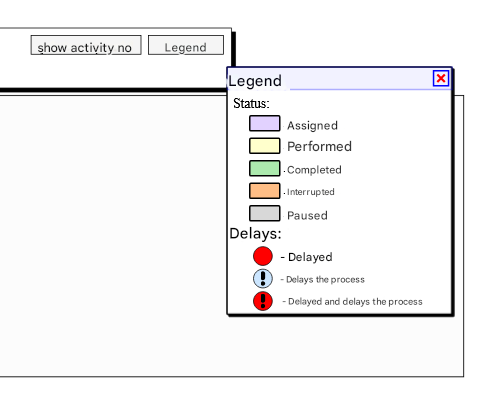
Figure 1. Colour legend of the activity statuses of the process execution history graph
Example
An important stage of the design of IT systems analysis and design life cycle is the modelling of business processes. The process architecture is of the key importance for the coordination and automation of task flow between functional teams of the organization and it is particularly significant for the integration of pre-existing data resources and IT services.
The presented example of modelling business processes, created with the use of the docuRob® WorkFlow platform tools and the BPMN 2.0 graphical notation, is a key element of the IT system design and implementation lifecycle. The user-friendly models supported by a design methodology are a platform for communications between the future system users and the process analysts and designers.
Business process models
The example presents a model for handling the order processes in an industrial company. Figure 2 and Figure 3 present the process models developed with the use of the docuRob® Process Designer tool. The Order process and its Business Analysis subprocess support the flow of assorted customer orders pertaining to products and services provided by the company.
The important part of our design and implementation methodology is development of a user story supported by a dynamic process model enabling users to assess and verify proposed solutions on the basis of the executable conceptual models. The minimum level of the specification of such models entails definition of the BPMN 2.0 process graph comprising the activities and flows and the associated work participant assignment (WPA) rules as well as the flow condition predicates.
The event model supporting the process flow control provides a powerful modelling and presentation layer to illustrate and discuss the dynamic aspects of the process semantics. In order to support the running process example all model events are qualified with the corresponding event definition rules specified in BPQL.
The Order type is represented in the model as an event handled by an event-driven gateway that selects the process path for the Parts, Product or Service event respectively. Shared procedures have been designed within the top level process. They are handled by an event-driven subprocess (Accounts payable subprocess) and by the activity of sending a message to the customer placing the order (event to Customer: and the following outgoing message Order cancellation notice).
To complete the business process development life cycle, after the user acceptance and verification has been reached, the following implementation work using the low-code features of the platform is required:
- design and specification of the electronic form supporting the process object comprising the document metadata and the required structural attributes,
- design and specification of the task GUI views based of the defined logical areas of the process electronic form,
- import and augmenting of the information required by the process ontology model,
- specification of the input and output parameters for the integrated applications and services,
- design and execution of the business process test scenario.
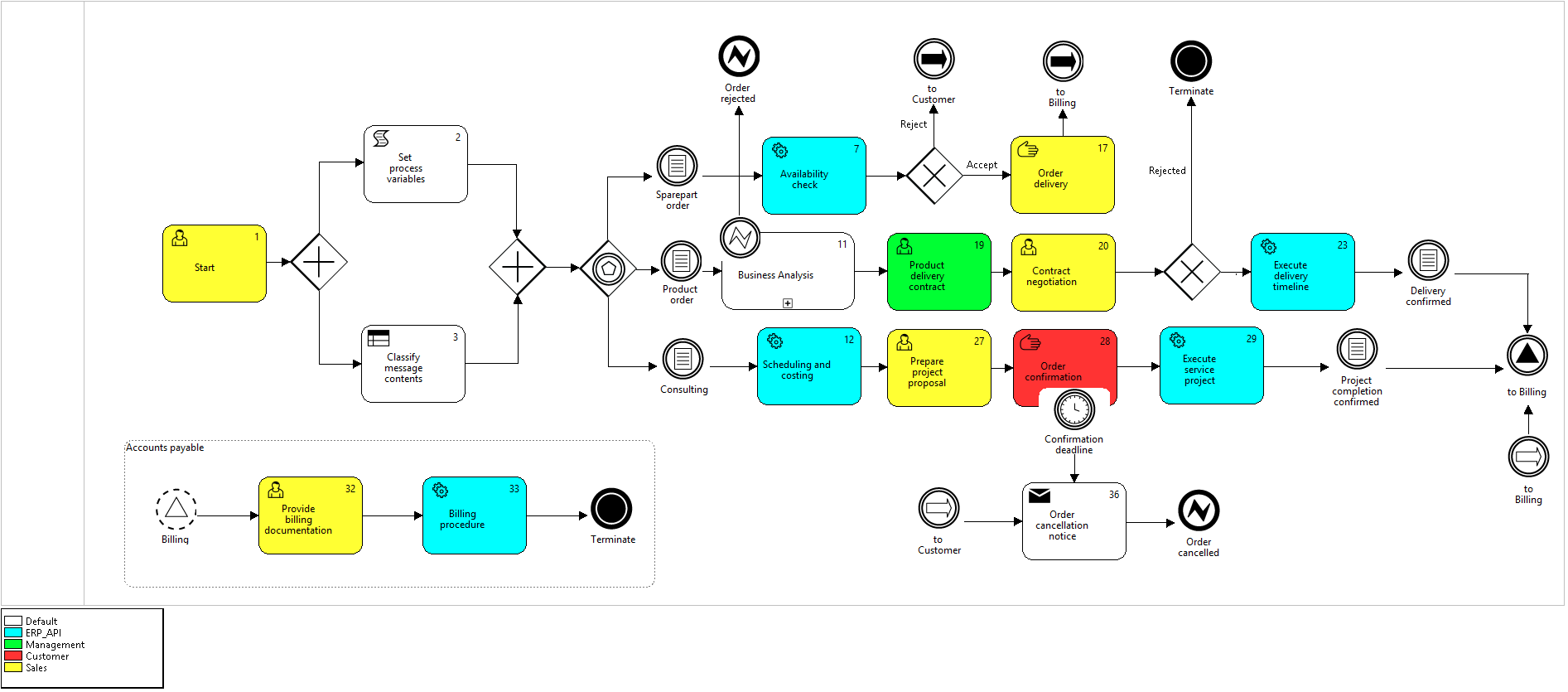
Figure 2. Order processing process model
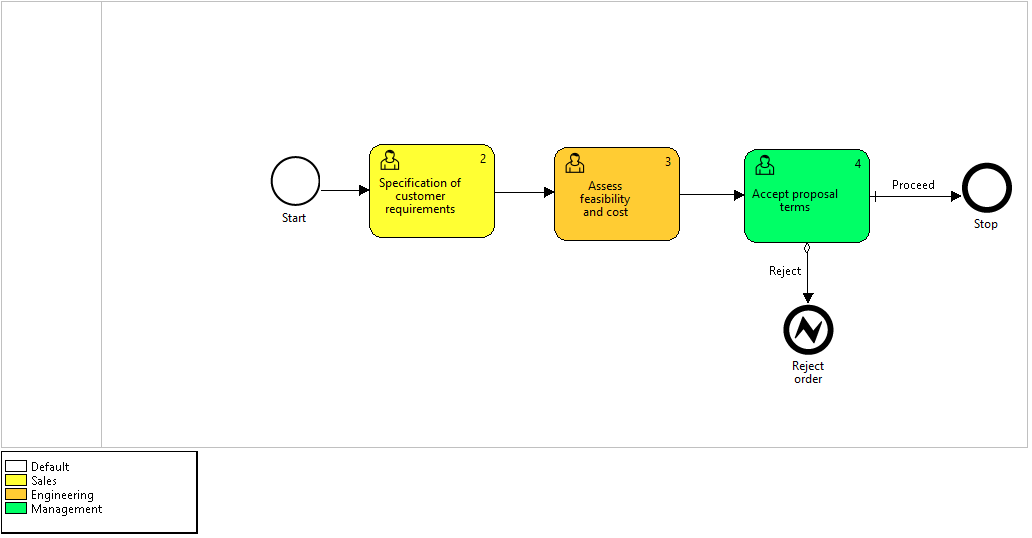
Figure 3. Business Analysis subprocess model
Product order
The evaluation of the Product order process paths pertaining to the order rejection variant and the order acceptance and execution variant are presented respectively in Figure 4 and Figure 5. In both cases the order document was subjected to the evaluation procedure supported by the Business Analysis subprocess (Figure 6). The Product order path was selected on the basis of the order message content and the corresponding event comprised in the configuration of the Event-based Gateway.
Although it has passed the business analysis procedure with the positive evaluation, the variant 1 of the Product order process instance was terminated as the result of a failure of the Contract negotiation task (activity number 20) performed by the member of the company sales staff.
The Product order process instance happy path executed in the variant 2 has traversed the negotiation and the delivery activities, which have been automatically managed by the ERP system, reaching the delivery confirmation (condition event). The final steps of the process instance have been provided by the Event-based subprogram Accounts payable comprising the Final event Terminate closing the Order processing process instance..
Note, that the Accounts payable subprocess may be executed for all kinds of the order procedures. It is invoked by the non-interrupting Signal Starting event Billing triggered by the throwing Signal event to Billing.
Termination of the Order processing process instance resulted in interruption of all events that have already received their respective tokens and have been waiting for a trigger generated by the corresponding throwing events.
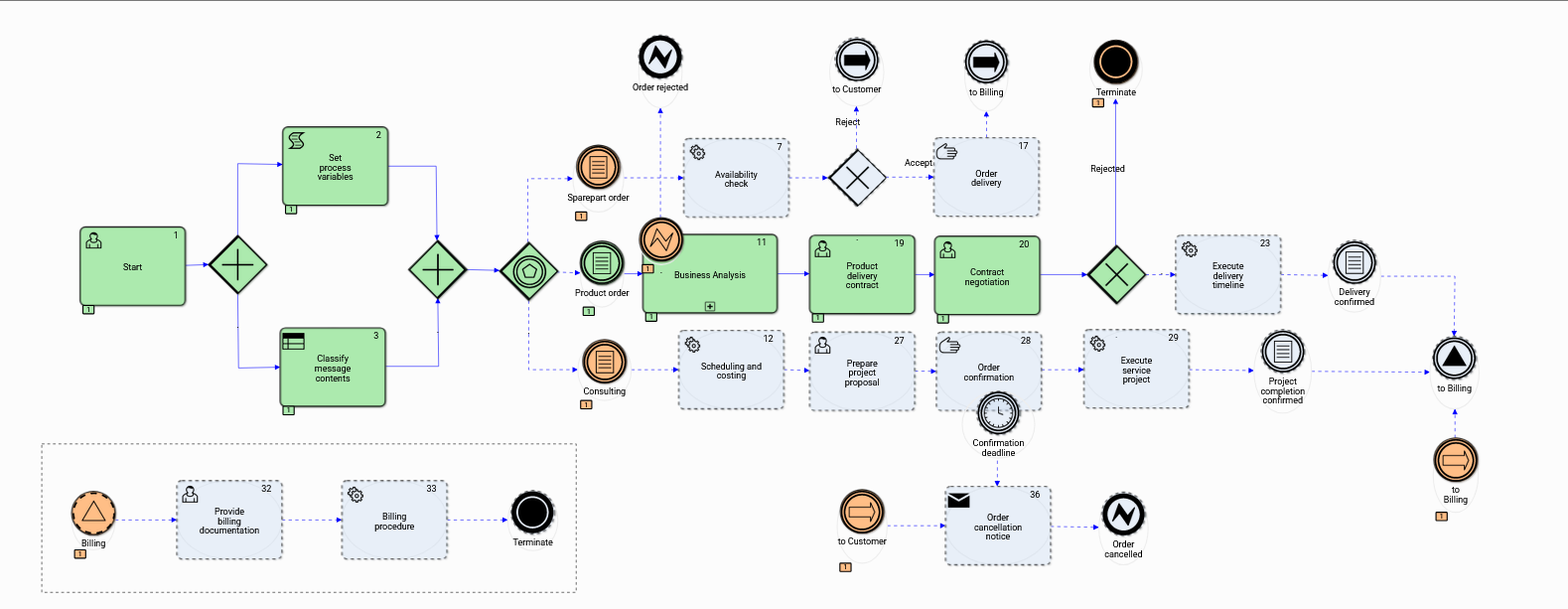
Figure 4. Product order – process instance history graph-1
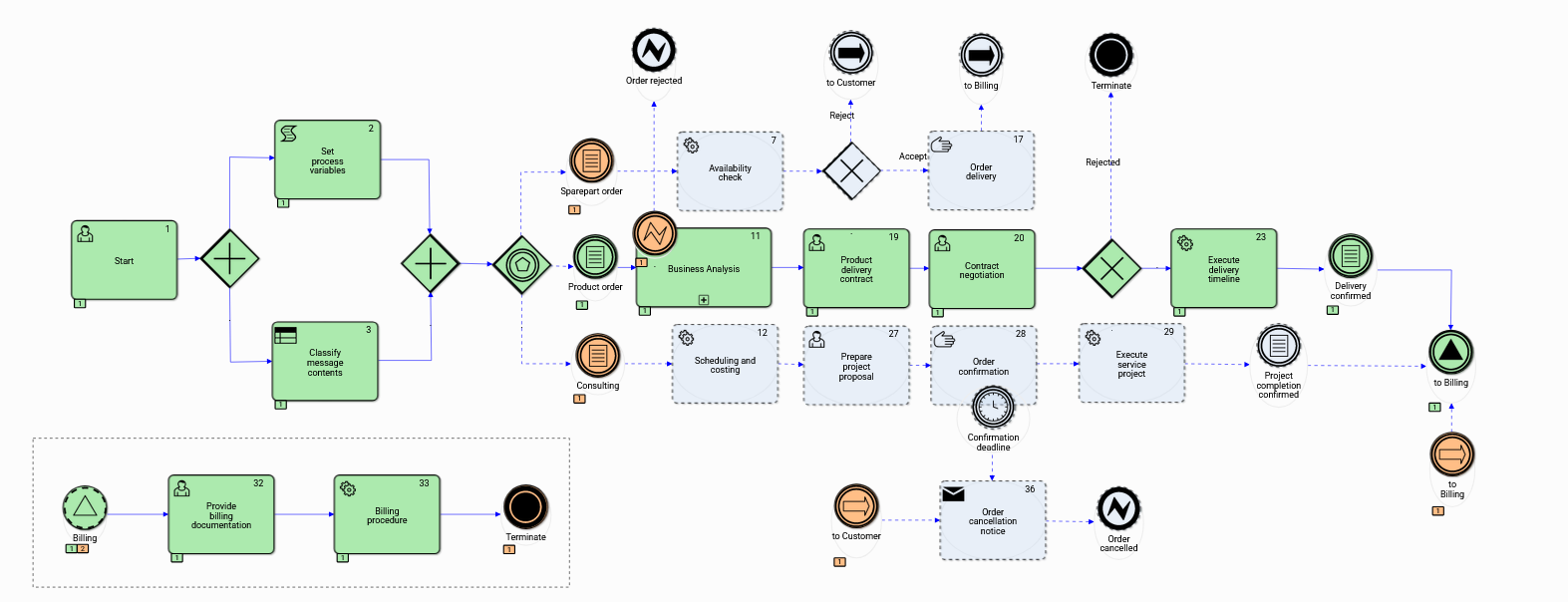
Figure 5. Product order – process instance history graph-2
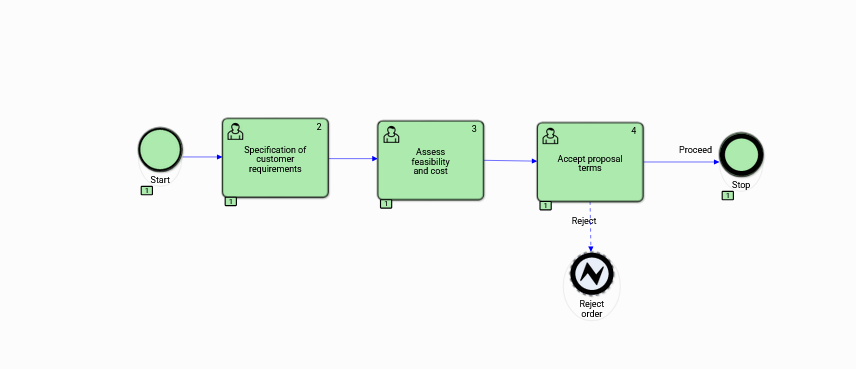
Figure 6. Business analysis – process instance history graph
Spare parts order
The spare parts order paths of the Order processing process instances shown in Figure 7 and Figure 8 represent two distinct execution variants. Variant 1 has not passed the parts availability check (Automatic activity no. 7) and in consequence has been rejected. A Link event to Customer passed the token to the Order cancellation notice activity generating the appropriate message to the customer.
Variant 2 of the spare parts process instance represents the happy path leading to customer order fulfilment. The shared Event-based subprocess has been invoked and it has generated the Terminate final event.
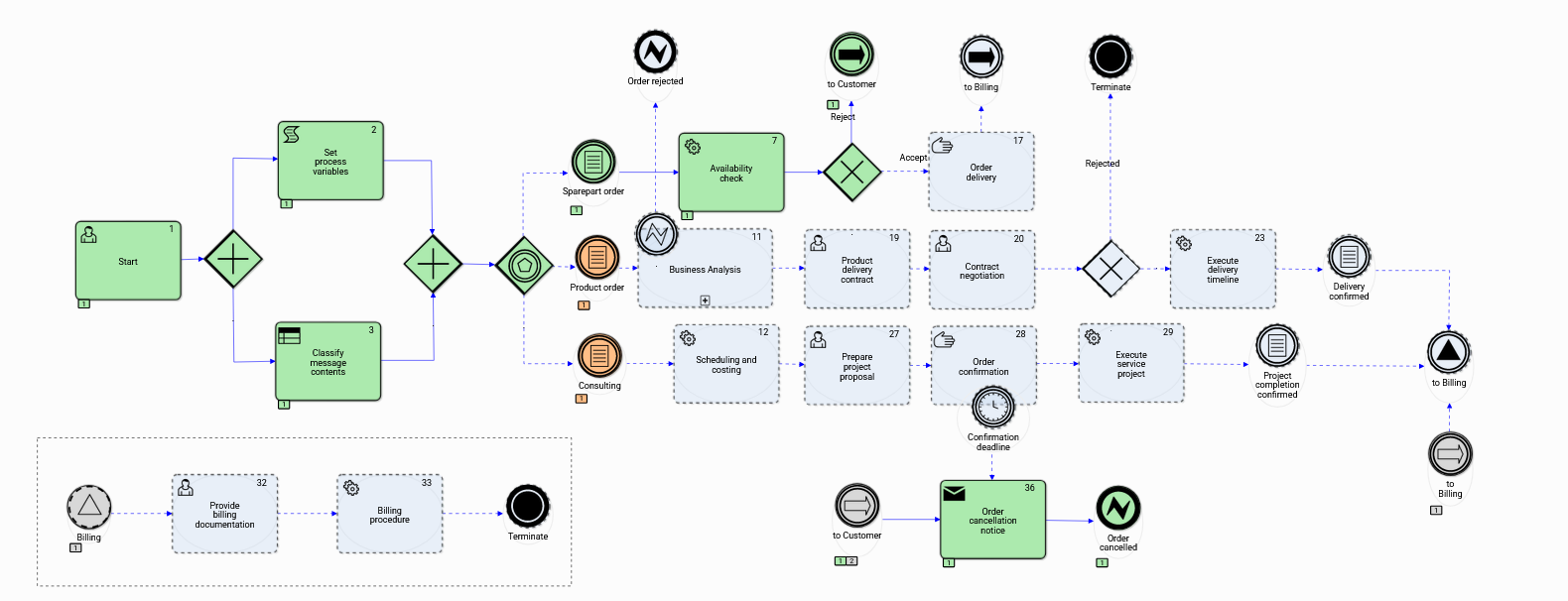
Figure 7. Spare parts order – process instance history graph-1
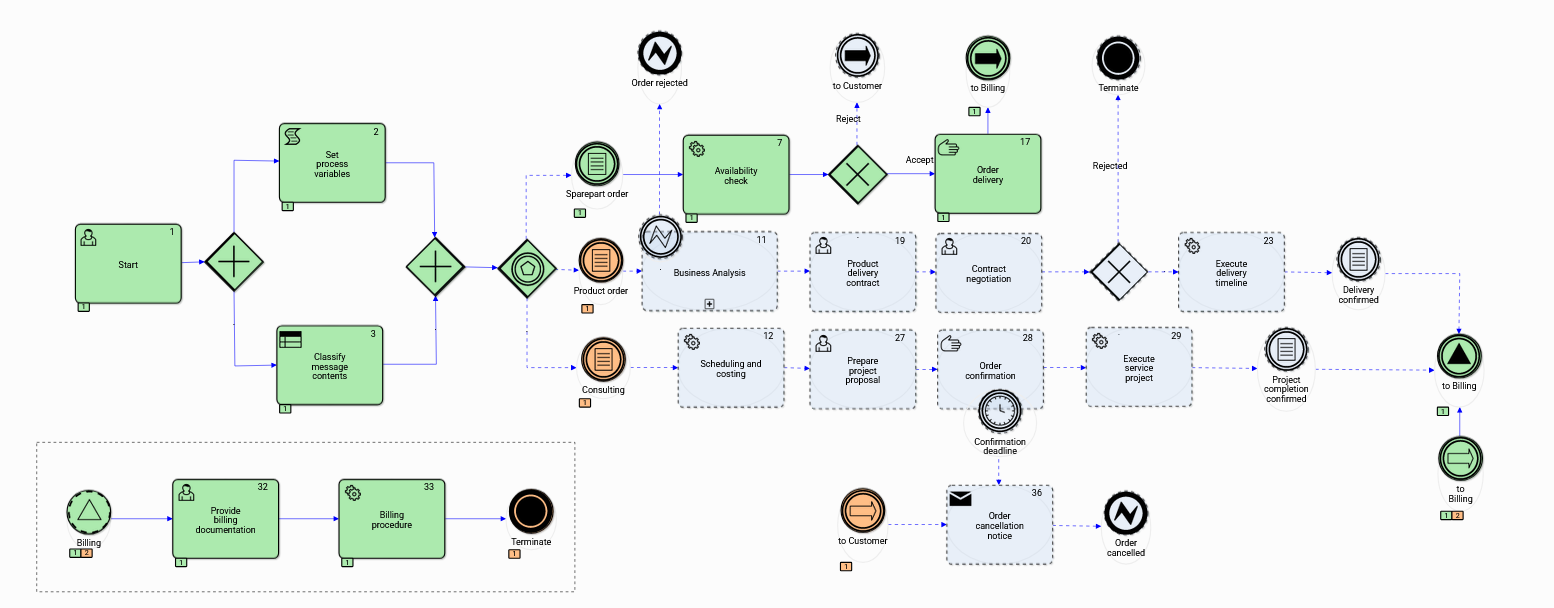
Figure 8. Spare parts order – process instance history graph-2
Consulting service order
The consulting service order paths of the Order processing process instances have been executed an the flow variants shown in Figure 9 thru to Figure 11. All variants executed the automatic activity Scheduling and costing assigned to the ERP role and the Task Prepare project proposal. The critical points in the Order processing process model were the Manual activity Order confirmation and the Condition event Project completion confirmed respectively shown as the variant 1 and variant 2 of the instance history graphs (Figure 9 and Figure 10).
In the first case the Order confirmation activity performed by the prospective customer exceeded the time limit. The Timer event passed the token on the exception flow and the cancellation message has been issued. The second case pertains to the project completion delay holding up the Condition event Project completion confirmed.
Variant 3 of the Consulting service order (Figure 11) represents the happy path of the process instance terminating after the invoice has been accepted by the customer.
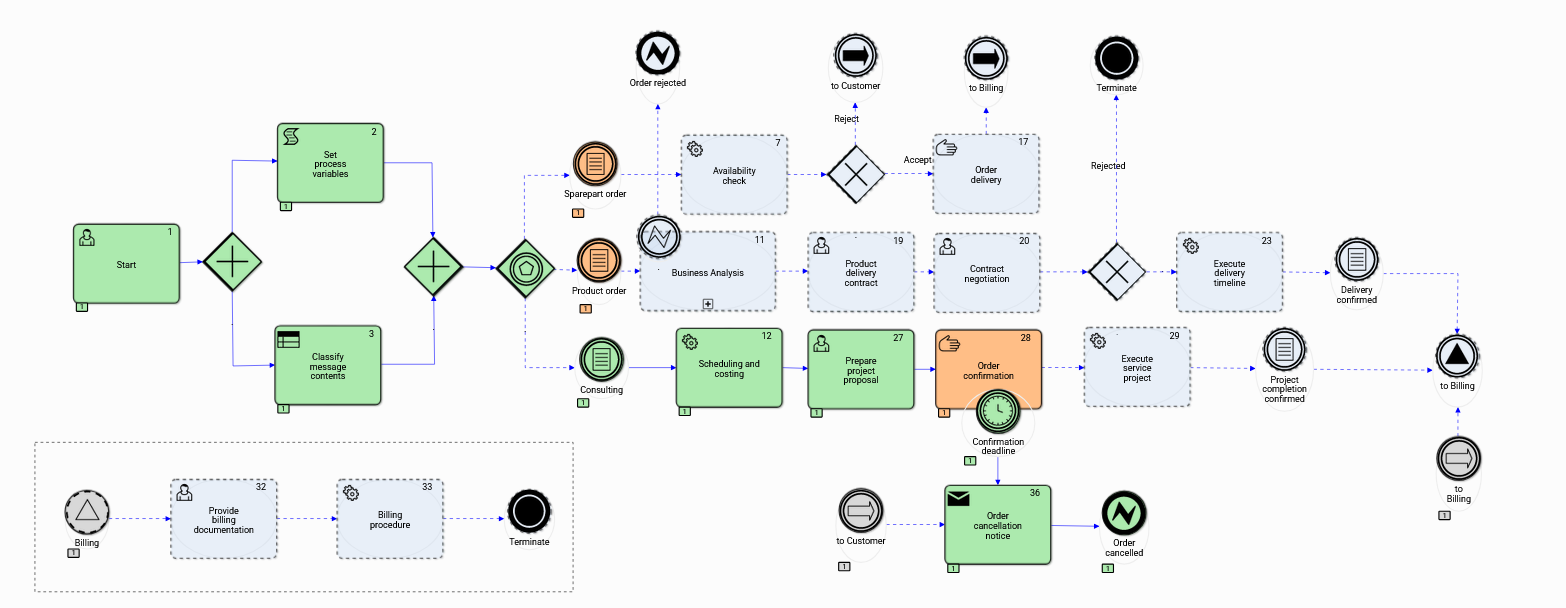
Figure 9. Consulting service order – process instance history graph-1
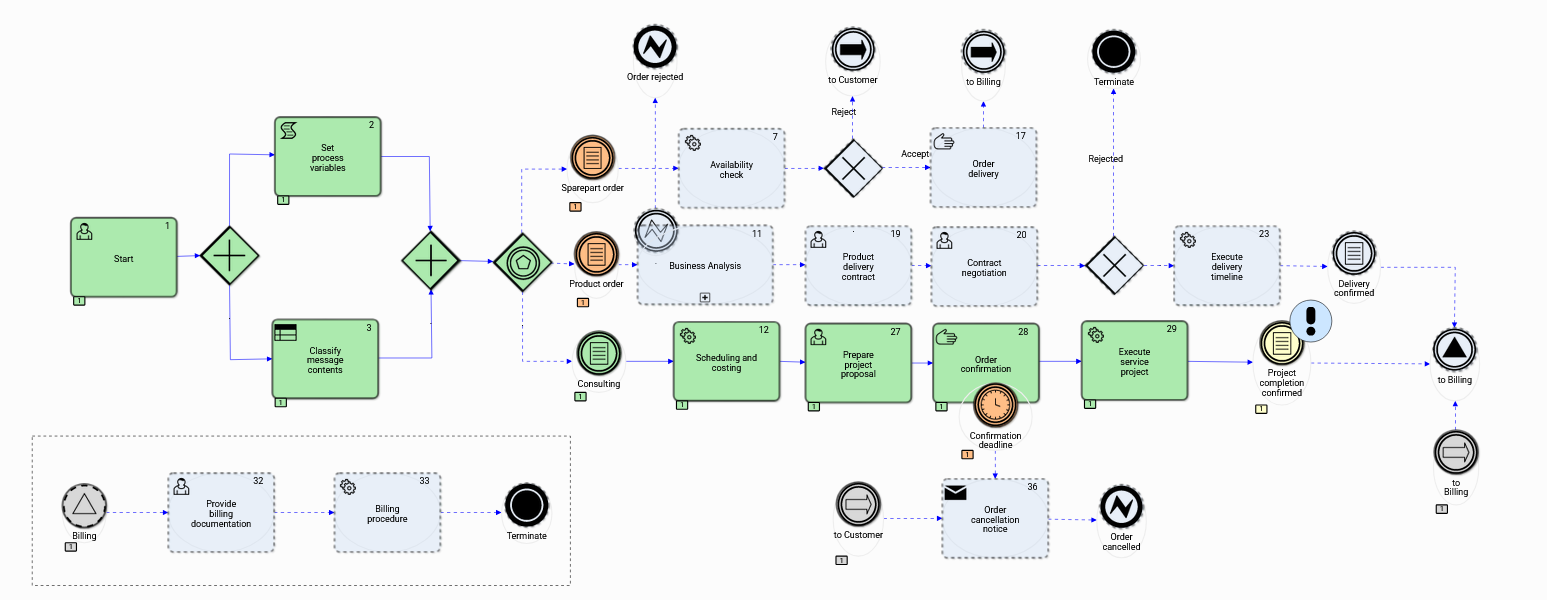
Figure 10. Consulting service order – process instance history graph-2
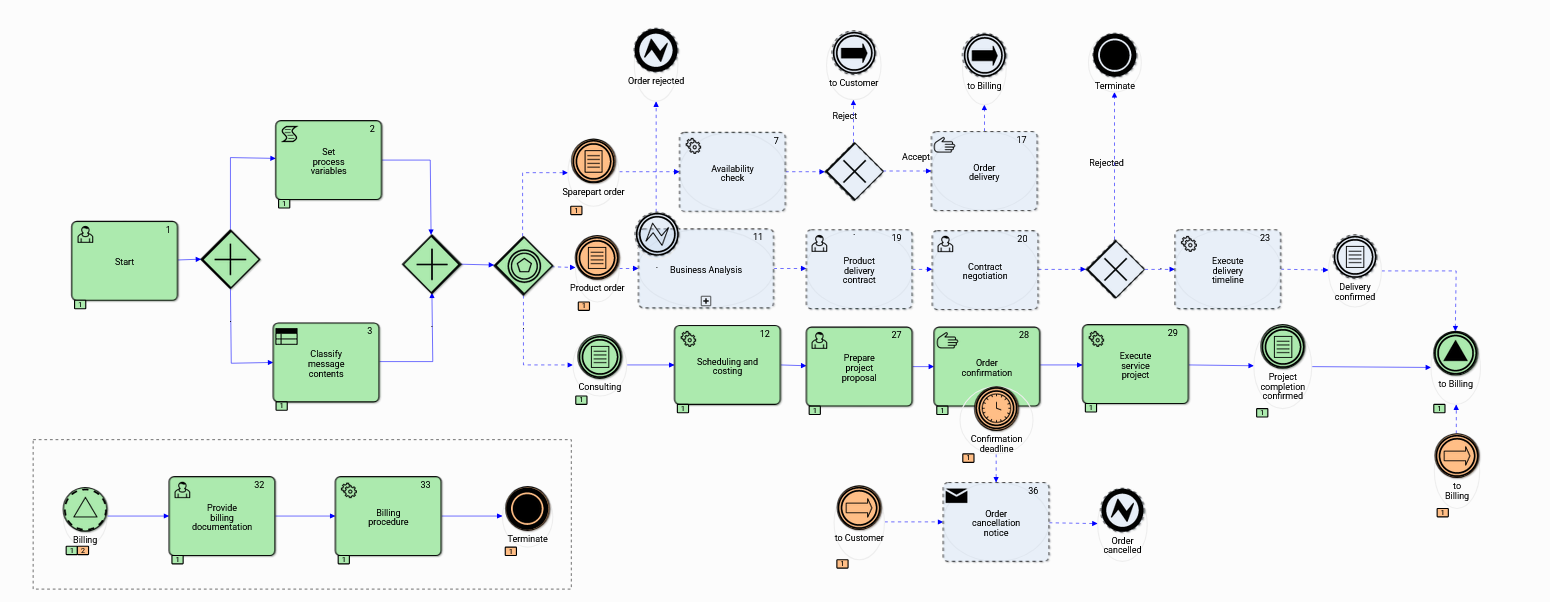
Figure 11. Consulting service order – process instance history graph-3